Getting Started with Agents
Without DataChain, an agent over a folder of files starts from raw bytes every session: re-downloading files, re-computing embeddings, re-filtering results. Effort is linear; nothing compounds. With the DataChain skill installed, every agent session deposits its conclusions into Data Memory as typed, versioned datasets, and the next session reads them as settled premises before generating its first line of code. After a week, your project has a knowledge base that both agents and humans navigate, and capability over your data rises with usage rather than staying flat.
Installation
Install the Skill
The skill gives agents data awareness: what datasets exist, their schemas, which fields can be joined, and the meaning of columns inferred from the code that produced them.
Your First Agent Task
Copy a reference image:
Enter prompt in Claude Code, Cursor, or Codex:
Find dogs in s3://dc-readme/oxford-pets-micro/ similar to fiona.jpg:
  - Pull breed metadata and mask files from annotations/
  - Exclude images without mask
  - Exclude Cocker Spaniels
  - Only include images wider than 400px
Result:
┌──────┬───────────────────────────────────┬────────────────────────────┬──────────┐
│ Rank │               Image               │           Breed            │ Distance │
├──────┼───────────────────────────────────┼────────────────────────────┼──────────┤
│    1 │ shiba_inu_52.jpg                  │ shiba_inu                  │    0.244 │
├──────┼───────────────────────────────────┼────────────────────────────┼──────────┤
│    2 │ shiba_inu_53.jpg                  │ shiba_inu                  │    0.323 │
├──────┼───────────────────────────────────┼────────────────────────────┼──────────┤
│    3 │ great_pyrenees_17.jpg             │ great_pyrenees             │    0.325 │
└──────┴───────────────────────────────────┴────────────────────────────┴──────────┘
The agent decomposed this into embedding, metadata, and filtering steps; each saved as a named dataset. Next time, it starts from what's already built.
Knowledge Base
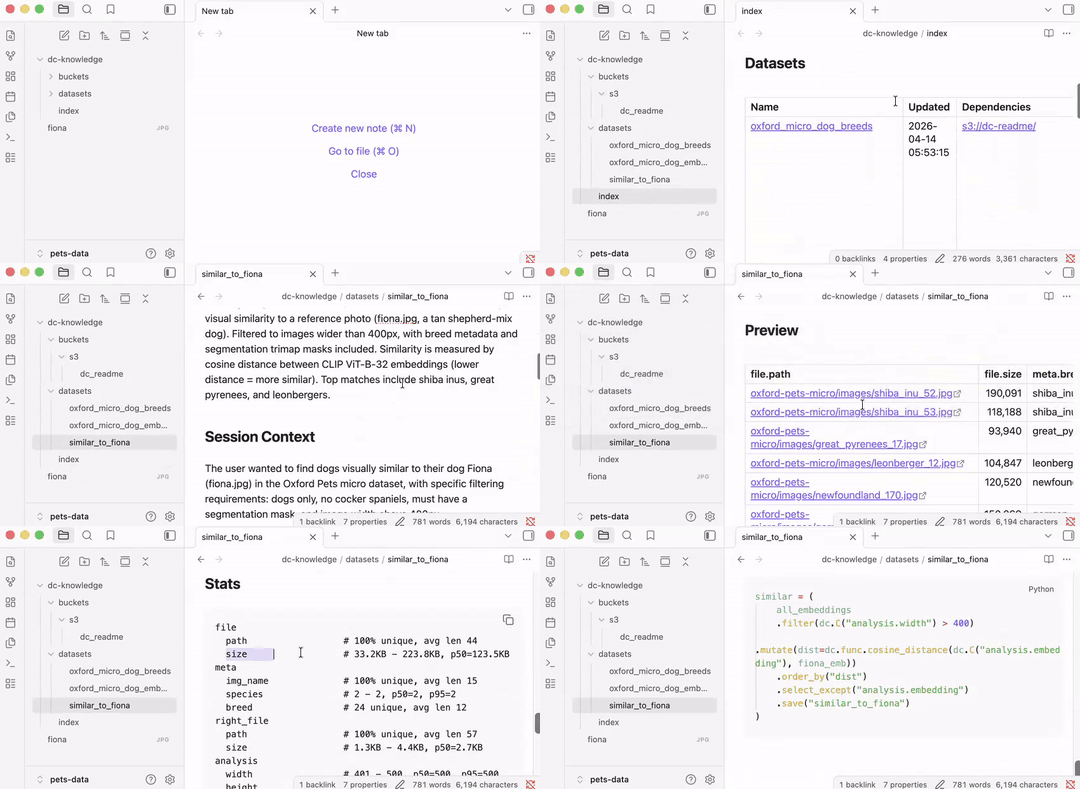
The datasets are registered in a knowledge base in dc-knowledge/, optimized for both agents and humans:
dc-knowledge
├── buckets
│   └── s3
│       └── dc_readme.md
├── datasets
│   ├── oxford_micro_dog_breeds.md
│   ├── oxford_micro_dog_embeddings.md
│   └── similar_to_fiona.md
└── index.md
Browse as markdown files, or open in Obsidian:
Run the skill prompt again to update the knowledge base after creating new datasets. See the Knowledge Base guide for details.
Next Steps
- Concepts: understand Data Memory, Datasets, and the dual engine
- Knowledge Base guide: skill installation, generation, browsing
- Guides: in-depth coverage of every capability